

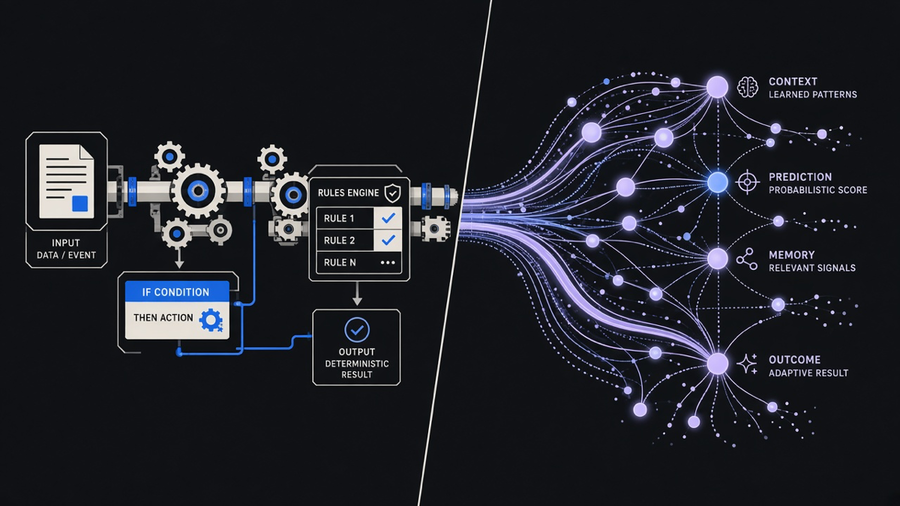
AI automation is software that uses machine learning or a language model to make a judgment call inside a workflow, not just execute a fixed step. Salesforce defines it as technology that reviews data, recognizes patterns, and makes logical choices instead of following a script line by line, and that is the part traditional automation cannot do. A rules engine can send an invoice reminder on day 30. It cannot read an angry customer email, decide the tone, draft a reply that matches your brand voice, and flag the one line that needs a human to sign off. That gap between “run the step” and “decide what the step should be” is the whole category.
What AI Automation Actually Is
Traditional automation, the kind that has run behind the scenes in finance and operations for two decades, works from predefined rules: if this field matches that value, move the record, trigger the next task, done. It needs structured input and breaks the moment the input doesn’t match the pattern it was built for. Salesforce’s own definition draws this line directly: robotic process automation follows predefined rules and rigid logic, while AI automation uses machine learning and natural language processing to understand, adapt, and improve over time, which lets it handle unstructured data a rules engine would just reject.
That “unstructured data” phrase is doing more work than it sounds like. A traditional system can process a form. An AI system can process a paragraph, a scanned PDF, a voicemail transcript, or a customer’s free-text complaint, and turn it into a structured decision on the other end. That is the actual technical difference, not “AI is automation but smarter.” It is automation that got handed inputs the old system was never built to read.
We’ve built this exact upgrade for clients more than once. One operator needed to expand a business to handle telephony and AI agents around the clock without hiring a night shift. The point was never to replace the front desk, it was to make sure the first touchpoint didn’t drop calls at 11pm. We built custom APIs and configured agents to triage and route, matching the business’s tone on every call, which is the unglamorous part vendors leave out of the demo reel.
Automation vs AI, and Why People Mix Them Up
Most people asking “automation vs AI” or “AI vs automation” are not actually confused about the technology. They are trying to figure out which one they need for a specific broken process, and the terms get used interchangeably in vendor marketing until the distinction disappears entirely. Automation is the umbrella: any system that runs a task without a human doing it manually every time. AI is one ingredient you can put inside that system, the part that handles ambiguity instead of exact matches.
Put plainly: automation without AI is a light switch. AI automation is a thermostat that reads the room and adjusts. Both save you from standing there flipping the switch yourself, but only one of them makes a judgment call. The distinction matters for budget, too, because AI components cost more to build and maintain than a static rule, and paying for a thermostat when a light switch would do the job is how automation projects go over budget in month three.
Here’s the opinion side of that, and it is not a hedge: most teams should start with rules-based automation for anything that has a single correct path, and reserve AI for the specific step where judgment is genuinely required. AI and LLMs are powerful, but they are nowhere near an “autopilot” that runs a whole business process unattended, and the best results still need someone with real subject matter expertise scoping which step actually needs the model. Building the AI layer everywhere, including the parts a simple if-then rule already covers, is the fastest way to spend more and get a system nobody trusts.
The Main Layers: RPA, Agentic, and Generative Automation
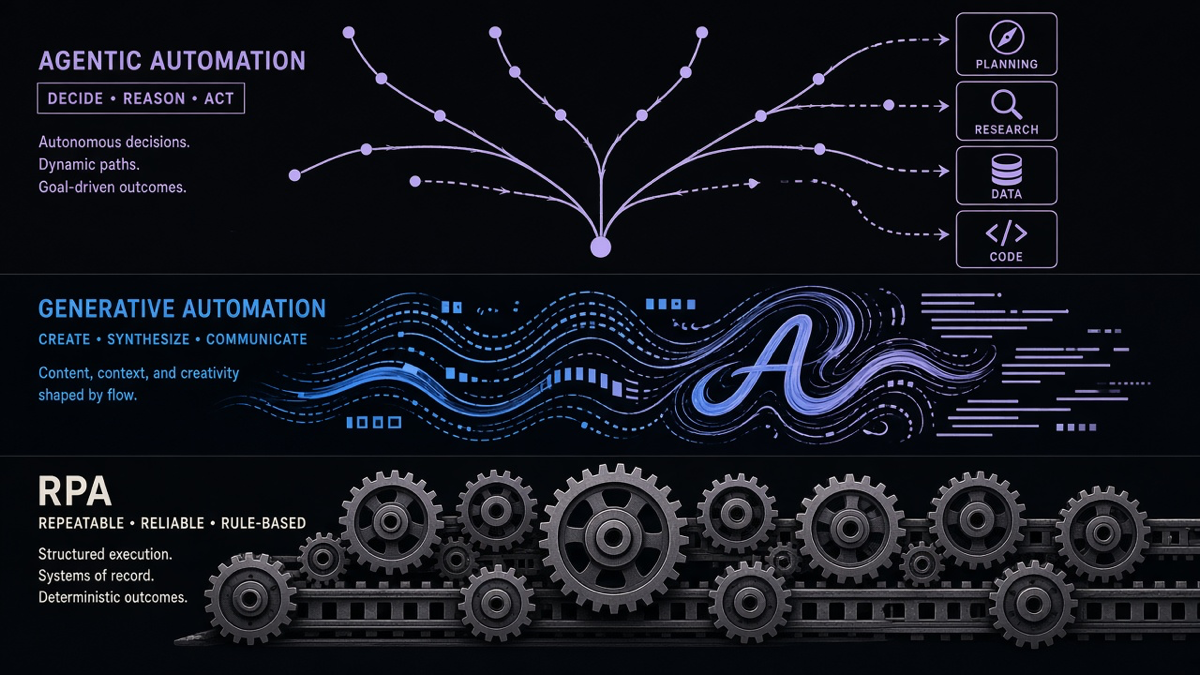
Under the single label “AI automation” sit at least three different technical layers, and conflating them is where most confusion starts.
Robotic process automation is the oldest layer: bots that mimic clicks and keystrokes to move data between screens, following the same predefined rules as always. RPA is not AI automation on its own, though many vendors now bolt an AI layer on top of it so the bot can handle a scanned document instead of only a clean structured field.
Generative automation is the layer built on large language models: drafting a reply, summarizing a document, writing a first-pass contract clause. It produces new content rather than routing existing data, and it needs a human review step before anything it produces goes out the door unsupervised.
Agentic automation is the newest and least settled layer: a system where an AI model plans a multi-step task, calls tools or APIs on its own, and adjusts its next move based on what the last step returned, instead of following one fixed script. This is closest to what people picture when they say “AI agent,” and it is also where oversight matters most, because a model deciding its own next three actions can drift from what you actually meant in a way a static rule never could.
If you’re mapping which layer a project actually needs, how to build an AI agent covers the practical build order for the agentic layer specifically, since that is the piece most teams overbuild first and scope correctly last.
Where AI Automation Actually Gets Used
The task list that shows up across every vendor’s own FAQ is a decent map of where this has already gone mainstream: data entry and extraction from unstructured documents, document classification and summarization, chatbot and email responses, predictive forecasting, image or speech recognition, and IT ticket triage, per Salesforce’s own published breakdown. None of these are exotic. They are the same back-office tasks that used to require a person reading a document and typing what they found into another system.
We see the same pattern from the delivery side. AI email automation is one of the more common starting points for a client, because inbound email is unstructured by nature and the payoff is immediate: someone stops manually reading and routing sixty messages a day. AI workflows tend to come next, once a client has one working automation and wants the pattern applied to two or three more processes, usually accounts payable, intake, or a CRM handoff. For a broader set of named use cases across departments, AI automation examples lays out where teams actually start versus where they end up six months later.
Most customers only need a fraction of what a large automation platform actually ships, and end up paying for the rest anyway. That is not a knock on the platforms, it’s a scoping problem: someone sold a full suite when the business needed one well-built workflow around one specific bottleneck. The fix isn’t a bigger platform, it’s a narrower first project that actually gets used.
Limits: Where AI Automation Still Needs a Human
AI automation does not replace judgment, it replaces the repetitive parts around judgment. Even ServiceNow, selling into this exact category, frames the honest version: augment human work, don’t replace it, so people can move off routine tasks onto the parts that need actual thinking. That is not marketing softness, it is the accurate description of where the technology tops out today.
The concrete risks are specific, not abstract: model drift, where a system’s outputs quietly get worse as real-world data shifts away from what it was trained on, algorithmic bias baked into historical data, and straightforward overdependence, where nobody is checking the automation’s output because it worked fine the last fifty times. Every one of those gets handled the same way: governance, a defined escalation path, and a human who actually reviews outputs on a schedule, not just when something breaks visibly.
Experienced people are not going anywhere because of this shift. Junior-level work without real expertise behind it is what gets replaced, because that work was often just following a pattern an AI system can now follow too. Someone still has to decide which pattern is worth automating, catch the edge case the model missed, and take responsibility when a customer-facing decision needs a real judgment call instead of a probability. That part of the job gets more important, not less, the more of the routine work gets handed off. If you’re weighing where your own business process automation plans should draw that line, that is the actual question to answer before buying any tool.