

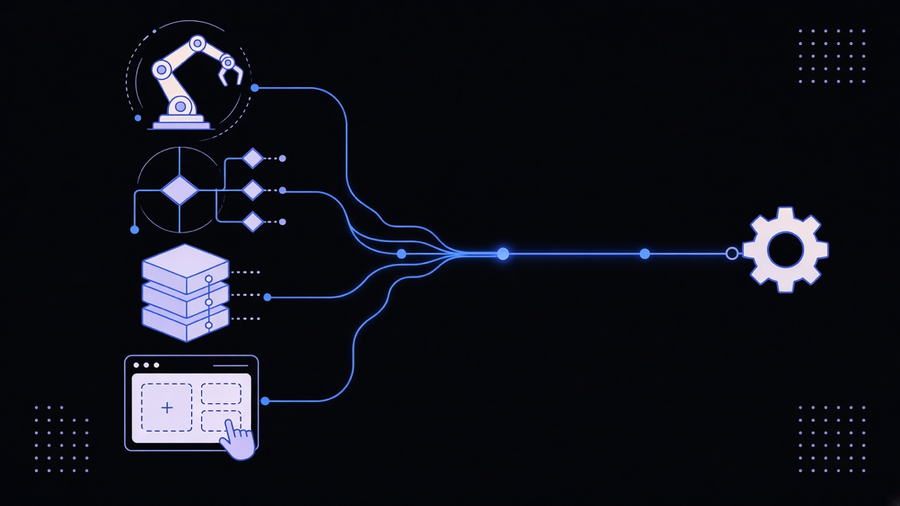
Business process automation tools are software platforms that connect the systems inside a workflow, CRM, invoicing, HR, support desk, so a process runs across all of them without someone copying data by hand between screens. That is the whole category in one sentence, and it is also where most buyers get stuck, because the tools sold under that label split into at least four different products with different prices, different skill requirements, and different jobs. Zapier’s own 2026 roundup of business automation software, one of the more widely cited lists of business automation tools on the market, picks a different “best for” winner in nine separate categories, which is a tell: there is no single tool that does this, there is a shelf of them.
The Category Splits Into Four Products, Not One
Robotic process automation platforms like UiPath automate the UI layer, a bot clicking and typing the way a person would inside legacy software that has no API. Agentic process automation platforms, Automation Anywhere is Zapier’s pick here, add a decision layer on top of RPA so the bot can read a document, judge what it says, and route it instead of just moving it. Enterprise iPaaS platforms like Workato connect modern systems directly through APIs, skipping the UI entirely, and are built for IT teams running integrations across ERP, CRM, and HRIS at scale. No-code workflow tools like Zapier and Make sit at the accessible end, wiring apps together through triggers and actions without a developer in the loop. Naming the four before shopping saves a demo call, because a sales rep who calls all four “business process automation software” isn’t wrong, they’re just selling you the shelf, not the specific bracket you need.
That confusion is the whole reason comparison sites exist. Gartner runs a dedicated reviews category for business process automation tools precisely because “automation software” stopped meaning one product years ago, and buyers kept ending up on the wrong page of the catalog.
What These Tools Actually Cost, and Where the Bill Surprises People
Pricing is where the category gets honest. HubSpot’s automation tier, Marketing Hub Professional, starts at $890 a month, and that is the cheap end of enterprise workflow tooling. Workato, an enterprise iPaaS platform, runs on annual contracts that typically start around $10,000 and climb from there, plus an implementation timeline that Zapier’s own review clocks at several weeks with IT involvement required the whole way. Automation Anywhere, the agentic pick, lists no public price at all, “contact for pricing” being vendor shorthand for “this depends on how big your company looks in our CRM.”
None of that is a knock on the vendors. It’s a structural fact about the category: business process automation solutions are priced and built for the workflows a platform vendor imagined when they built the product, and every business’s actual workflow is a little different from that imagined one. Most operators end up paying for the top two pricing tiers to get the one integration or automation depth they actually need, then never touch the rest of what they bought. That is not a fringe complaint. Most customers only use 10 to 20 percent of a given software platform’s features, and get billed for the other 80 percent anyway. If your team is choosing between HubSpot’s $890 tier and its $1,450 tier because one workflow needs the higher plan, you are paying enterprise iPaaS money for what is really a single automated handoff, and there is a cheaper way to build that one handoff directly.
Matching the Tool to the Process, Not the Other Way Around
The fix isn’t a fifth platform, it’s ordering the decision correctly. Fix the process before you buy tools: map the handoff that is actually broken, then pick the narrowest tool that closes that specific gap. A no-code workflow tool is the right call for connecting a form to a CRM. An RPA bot earns its keep on a legacy system with no API, the kind a 20-year-old ERP still running in a back office tends to be. An iPaaS platform makes sense once you have genuinely complex, multi-department integrations running at volume, not because the sales page called it “enterprise-grade.” Reading up on what process automation is before evaluating vendors keeps that scoping conversation honest, since half the confusion in a vendor demo comes from a term the salesperson and the buyer are quietly defining differently.
We built a client’s inbound and outbound HR triggers this way, the kind of scoping work BPM software is meant to sit above rather than replace: instead of licensing a general HR automation suite, we mapped the specific events (a candidate applies, an offer gets signed, a background check clears) and wired triggers and responses across the third-party systems already in place. No seat-based license, no unused modules sitting in a dashboard nobody opens. The same logic applies to reporting: a founder we worked with was running the business out of Google Sheets because that’s what the team knew, not because it was working. We built Metabase dashboards against the actual recurring questions the business asked, and had usable, real-time answers inside 90 days, a timeline that would have gone the other way if we’d started by shopping for a BI platform instead of naming the questions first.
Where a Platform Earns Its Keep, and Where Custom Wins
None of this means every business should skip business process automation software and build everything from scratch. A platform earns its price when the workflow really is standard: lead routing, ticket assignment, drip email sequences, the categories HubSpot and Zapier are built around. Buy the platform for that. But the moment a workflow has a business-specific rule (a fraud check that only triggers above a certain transaction size, a compliance step that has to feel invisible to the end user, an approval chain that mirrors how your specific org chart works) a general platform starts fighting the process instead of running it. We built exactly that kind of custom flow for a client processing high-volume payments: transactions above an agreed threshold got escalated through a KYC step that stayed unobtrusive for everyone else, a rule no off-the-shelf payments automation tool ships with by default because it isn’t generic enough to sell to everyone.
That is the case for working with a team that customizes the automation around your process instead of renting a platform and reshaping your process to fit it. It costs more up front to map the actual workflow before writing a line of code. It gets better results than deploying a tool nobody configured properly, and it tends to be cheaper across a few years once you subtract the unused seats and the modules purchased for a feature the team touches twice a year.
Picking From the Shelf Without Getting Sold the Whole Shelf
Start every evaluation with the process, not the demo. Name the specific handoff that breaks today: where the data stalls, who re-enters it, how long the delay costs you. Only then match it against the four product categories above; a $10,000-a-year iPaaS contract for a workflow that a $20-a-month no-code tool would have handled is not a strategic buy, it’s a sales team that closed before you asked the right question. For teams comparing business process automation examples against their own workflow, the pattern holds across every one worth studying: the automation that stuck was scoped to a named, specific problem, and the ones that got ripped out a year later were bought because the category sounded like the answer.
The category sold as “business process automation tools” is real and worth buying into. It just isn’t one purchase decision. It’s four, and only one of them fits the workflow sitting in front of you today.